Lab Augur EZCAD2
A practical experimentation lab for fiber laser owners. Explore starting parameter references, plan controlled tests, document what actually happened and build knowledge from your own machine.Un laboratorio de experimentación para propietarios de láser de fibra. Explora referencias de parámetros iniciales, planea pruebas controladas, registra lo que realmente ocurrió y construye conocimiento sobre tu propia máquina.
9 free uses of eligible actions. No day limit advertised. One-time license purchase; no reinstall required.9 usos gratuitos para acciones habilitadas. No se anuncia límite por días. Licencia de pago único; no necesitas reinstalar.
From random settings to informed experimentsDe parámetros al azar a experimentos con criterio
Finding the right marking settings is rarely a matter of copying one number from someone else's machine.Encontrar parámetros de marcado adecuados rara vez consiste en copiar los números de otra máquina.
Starting without a methodEmpezar sin método
Try values, change several variables at once and struggle to remember what worked on each material.Probar valores, cambiar varias variables a la vez y después intentar recordar qué funcionó con cada material.
Starting with Lab AugurEmpezar con Lab Augur
Review identified references and compatibility warnings, prepare systematic variations, record real observations and reuse your findings.Consultar referencias identificadas y advertencias de compatibilidad, preparar variaciones sistemáticas, registrar observaciones reales y reutilizar lo aprendido.
A laboratory workflow built around your machineUn laboratorio que parte de tu propia máquina
Four simple stages, with no direct control of your laser.Cuatro etapas sencillas, sin controlar directamente tu láser.
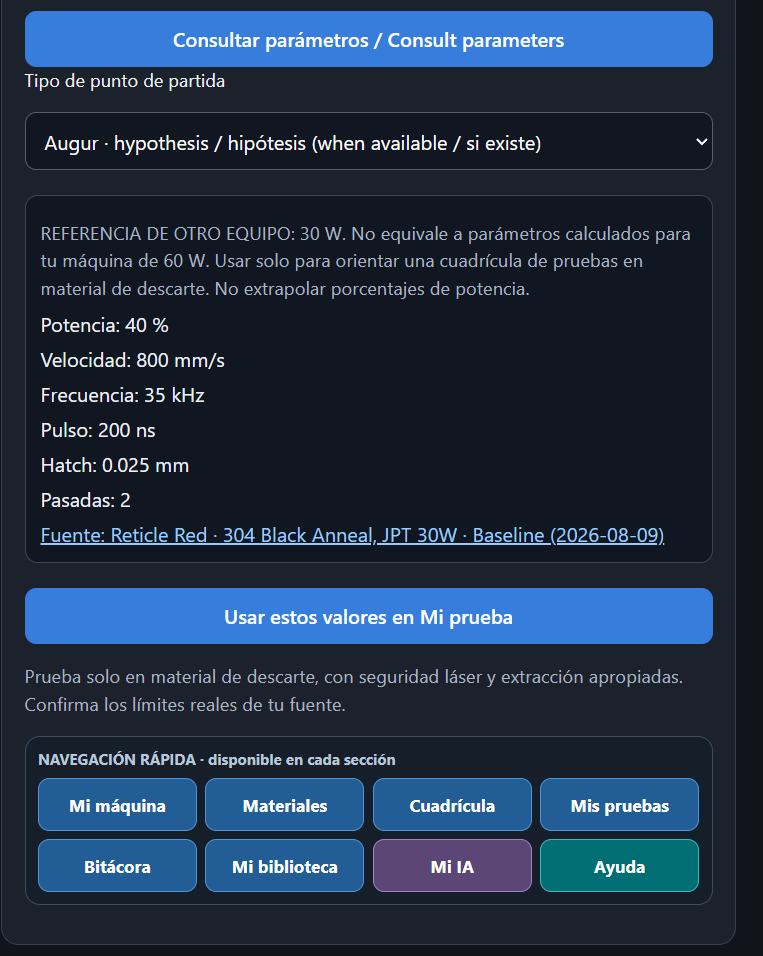
Know where a parameter reference comes fromConoce el origen de cada referencia
Choose a material and marking objective. When a reference is available, Lab Augur displays its values, source and relevant equipment warnings. Values from another machine are not guaranteed to work on yours.Elige material y objetivo de marcado. Cuando existe una referencia, Lab Augur muestra valores, procedencia y advertencias sobre el equipo. Los valores de otra máquina no garantizan resultados en la tuya.
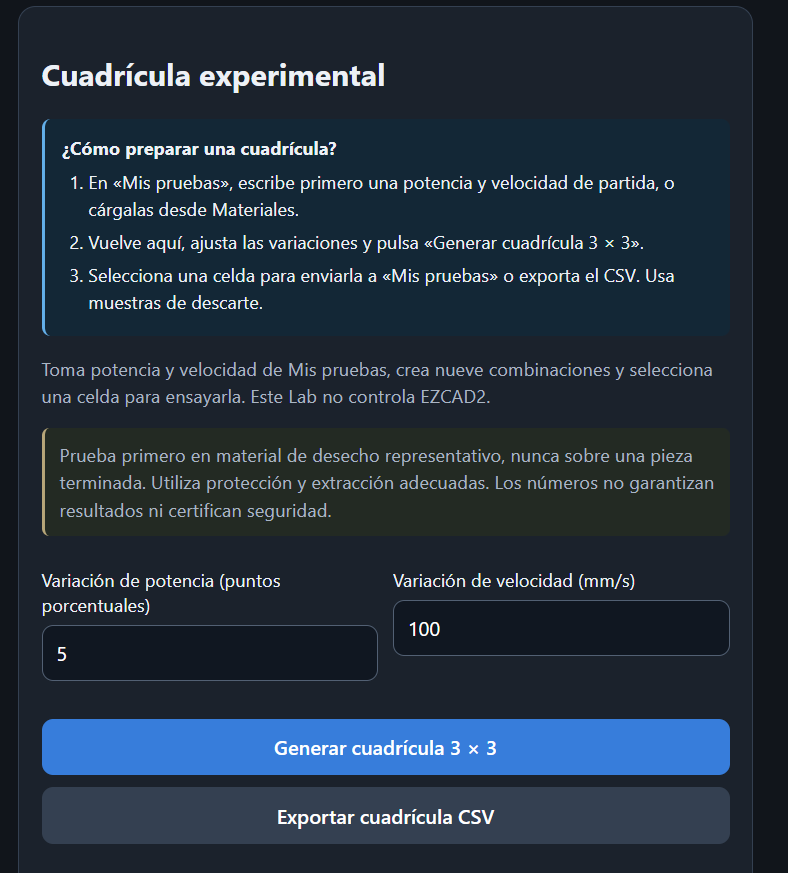
Turn one starting point into a structured experimentConvierte un punto de partida en un experimento ordenado
Create a 3 × 3 grid of power and speed variations. Select a cell to prepare a test or export the grid as CSV. The grid is a planning tool, not a physical result simulator.Crea una cuadrícula 3 × 3 con variaciones de potencia y velocidad. Selecciona una celda para preparar una prueba o exporta la cuadrícula en CSV. Es una herramienta de planeación, no un simulador de resultados físicos.
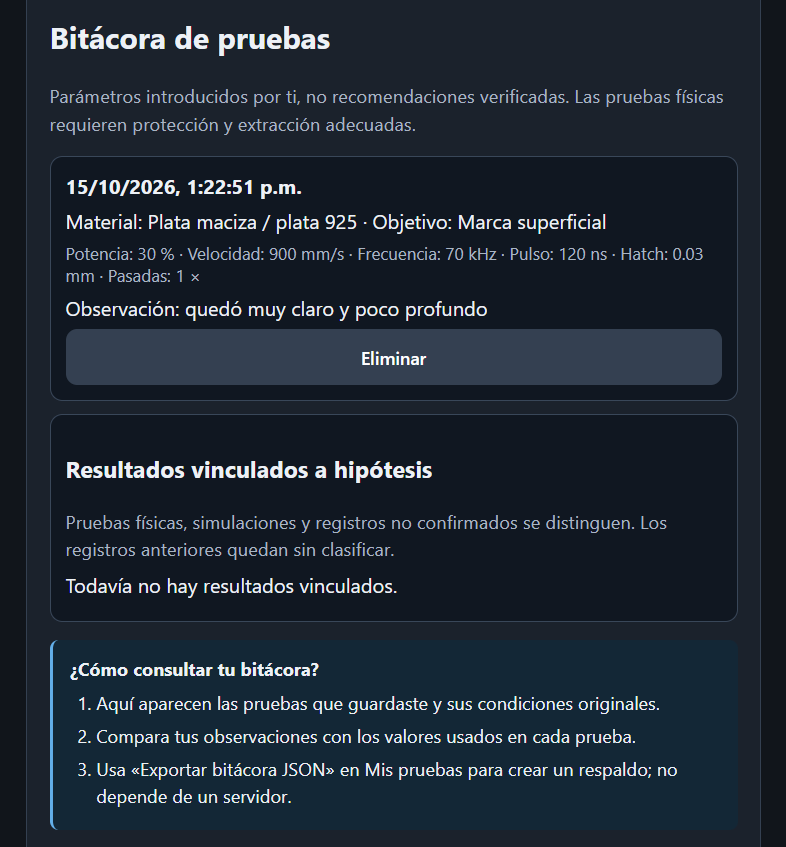
Keep the results, not just the settingsConserva los resultados, no solo los números
Record the material, parameters, test status and what you observed. Your journal distinguishes physical tests from simulations and unconfirmed records.Registra material, parámetros, naturaleza de la prueba y lo que observaste. La bitácora distingue pruebas físicas, simulaciones y registros sin confirmar.
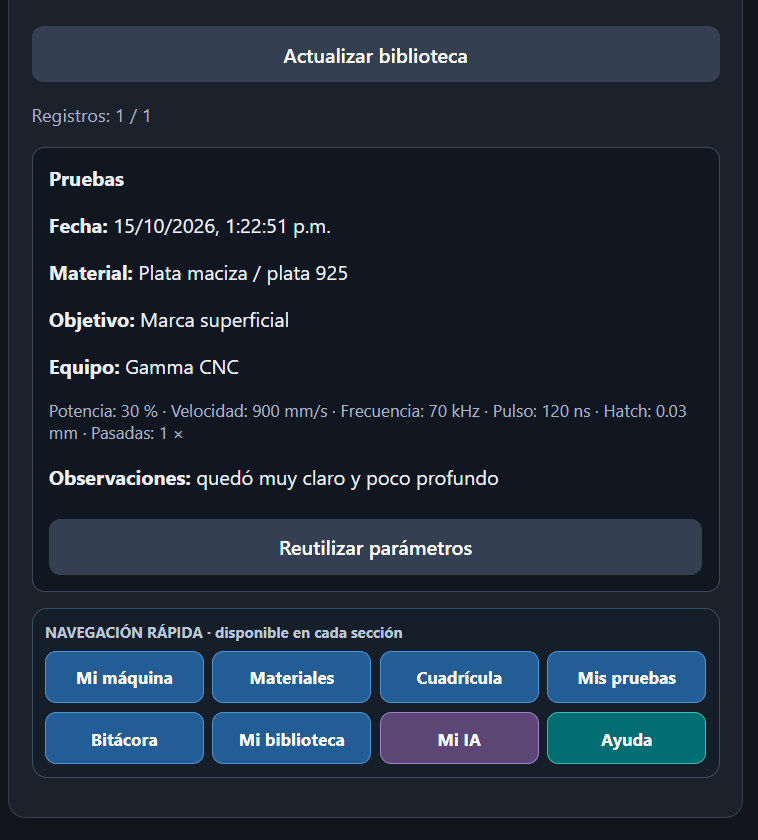
Build a searchable library of your own experimentsConstruye tu propia biblioteca de experimentos
Find saved tests by material, equipment or result, and reuse previous parameters without changing the original record.Busca pruebas guardadas por material, equipo o resultado, y reutiliza parámetros sin modificar los registros originales.
Tools for curious fiber laser ownersHerramientas para quienes quieren conocer mejor su láser
Everything shown here is part of the real application.Todas estas funciones forman parte de la aplicación real.
Machine profilePerfil de máquina
Keep the technical context of your laser together.Conserva el contexto técnico de tu equipo.
Starting referencesReferencias iniciales
Review identified sources and compatibility warnings.Consulta fuentes identificadas y advertencias de compatibilidad.
3 × 3 test gridCuadrícula 3 × 3
Plan controlled power and speed variations.Planea variaciones controladas de potencia y velocidad.
Journal & libraryBitácora y biblioteca
Record, search, compare and reuse your observations.Registra, busca, compara y reutiliza observaciones.
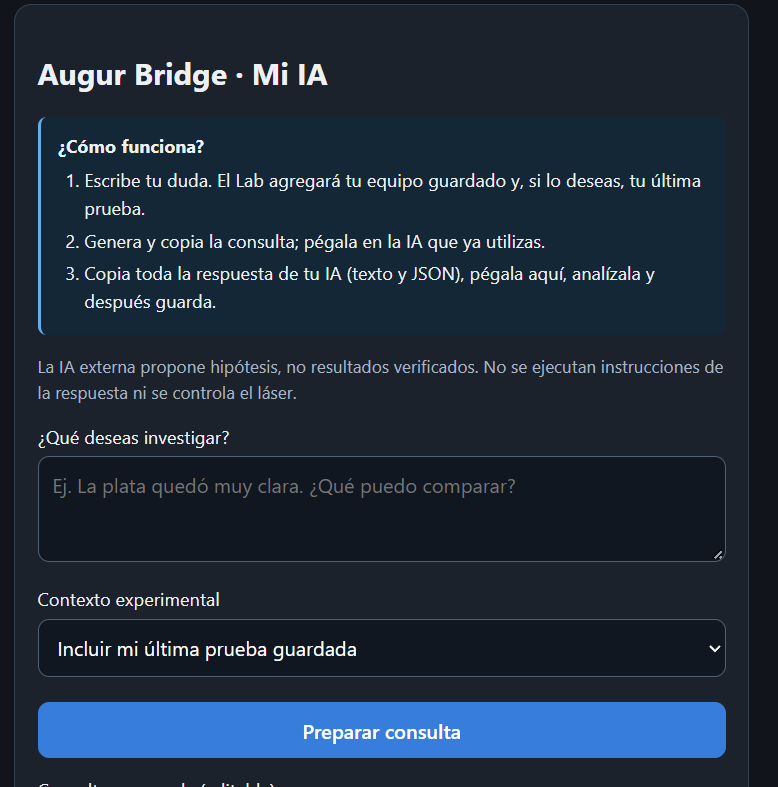
Augur Bridge · My AIMi IA
Prepare contextual questions for an external AI and retain hypotheses; no built-in AI service or verified AI results.Prepara consultas con contexto para una IA externa y conserva hipótesis; no incluye servicio de IA ni verifica sus respuestas.
JSON backupRespaldo JSON
Export and recover saved lab information.Exporta y recupera la información guardada del laboratorio.
Bring your own AI into the investigationIncorpora tu propia IA a la investigación
Generate a question containing your saved machine profile and, optionally, your last test. Paste it into the AI you already use, then bring the answer back for review and storage. AI suggestions remain unverified hypotheses.Genera una consulta con el perfil de tu máquina y, si quieres, tu última prueba. Pégala en la IA que ya utilizas y devuelve la respuesta al laboratorio para revisarla y guardarla. Las sugerencias de IA siguen siendo hipótesis sin verificar.
Try the lab. Keep it when you're ready.Prueba el laboratorio. Consérvalo cuando tú decidas.
Download the Windows application and explore 9 eligible actions for free. Each button explicitly marked as consuming “1 use” deducts one use; you choose where to spend them. To continue after the trial, purchase a one-time lifetime license and activate the same installation.Descarga la aplicación para Windows y explora 9 acciones gratuitas. Cada botón marcado expresamente con «1 uso» descuenta un uso; tú eliges en qué utilizarlos. Para continuar después de la prueba, compra una licencia perpetua de pago único y activa la misma instalación.
Lab Augur does not operate your laser, replace EZCAD2, generate executable marking files or guarantee engraving outcomes. Always test on scrap material and follow laser safety procedures.Lab Augur no controla tu láser, no sustituye EZCAD2, no genera archivos ejecutables de marcado ni garantiza resultados. Prueba siempre en material de descarte y sigue las medidas de seguridad láser.